Before making any final adjustments, proofread your poster for any spelling or grammatical errors. Double-check the event details, such as the date, time, and location. Make any necessary corrections to ensure your poster is error-free.
Take a moment to review the overall layout of your poster. Make any necessary adjustments to the text, images, or shapes to ensure a visually appealing and balanced design. This may include resizing, repositioning, or changing the alignment of elements on the page.
Remember you shared your document, check if there is anyone else you can share it with to edit it.
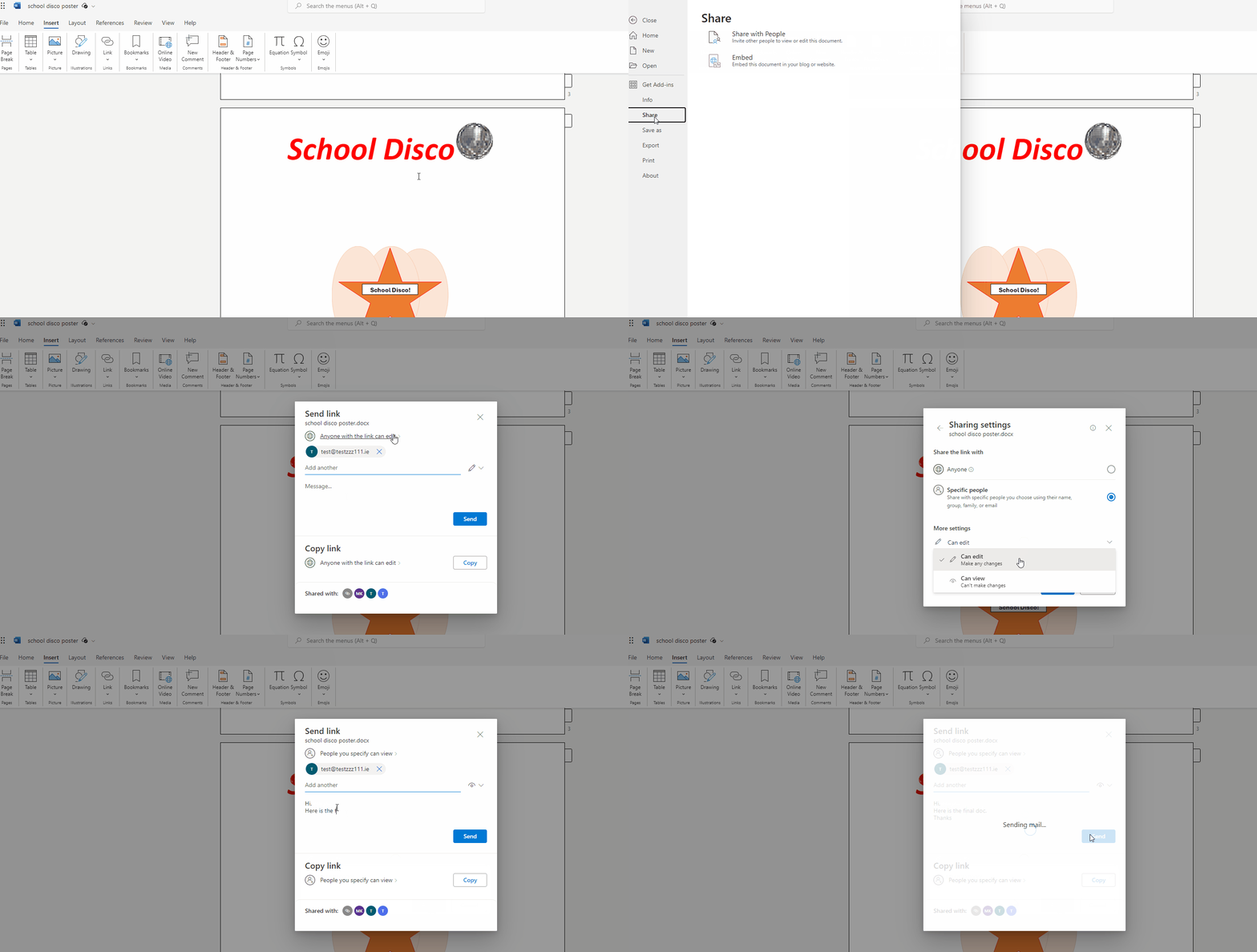
Invite your teammates to collaborate on your disco poster in real-time. Click on the 'Share' button in the top-right corner of the Word window. Enter your teammates' email addresses and click 'Send'. Once your teammates have access, you can all view and edit the document simultaneously.
You know who to add comments, make sure your comments add value and to question the comments you get to ensure they suit your poster.
Communicate with your teammates by adding comments to your document. To add a comment, highlight the text or element you want to comment on, right-click, and select 'New Comment'. Write your comment and press 'Enter' to submit.
You're previewing this lesson. Get full access to this lesson and hundreds more — each one ready to teach, with interactive activities, printable resources and pupil progress tracking built in.