You're previewing the student experience. You don't need to complete this lesson — your progress and XP aren't saved.
Beginner
60 mins
Teacher/Student led
+95 XP
Pupils work through this independently

What Is a Coursework Project? Meet the Process and Your Brief

This lesson introduces the coursework project process. You will set up a digital project journal, learn the stages of a project, choose one of four briefs, and begin typing the cover and first section of your journal.

Teacher Class Feed

Load previous activity

    1 - Introduction: What This Course Is For ~5 mins

    Illustration for Introduction: what this course is forIn this course you finish a mini-project on a brief you choose. You type a Project Journal, export a short TY report as a PDF, and give a short presentation.

    This is TY rehearsal for the AAC process, not Leaving Certificate or official SEC work.

    Today you set up your journal, meet the stages, and choose your brief.

    Do now: Read what you will finish, then move on.

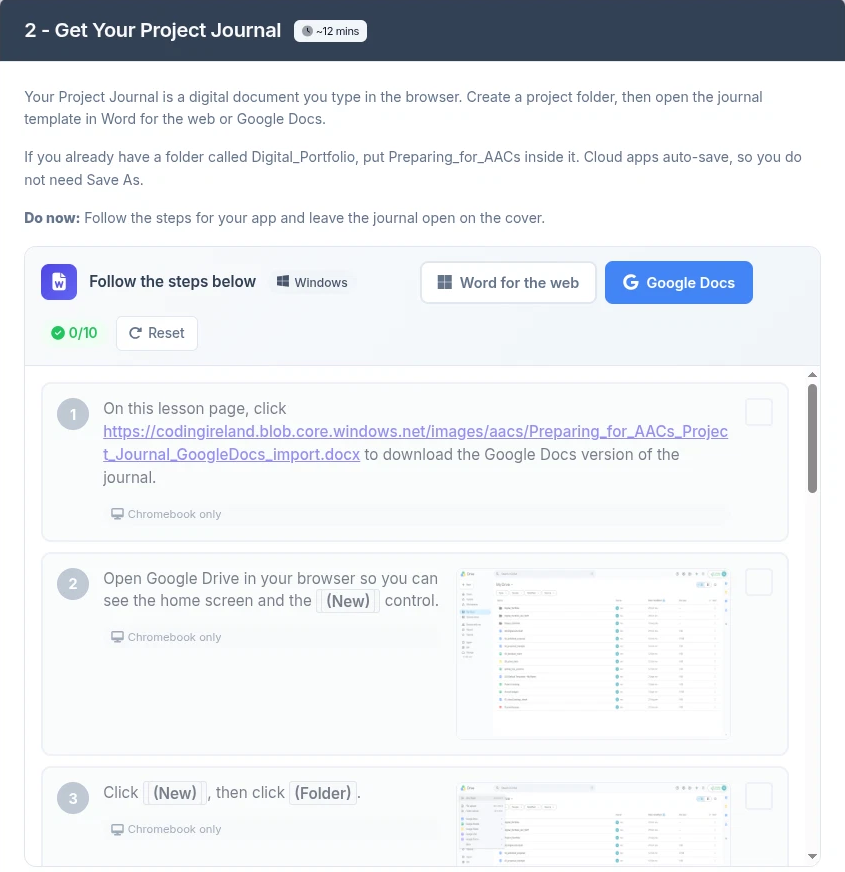
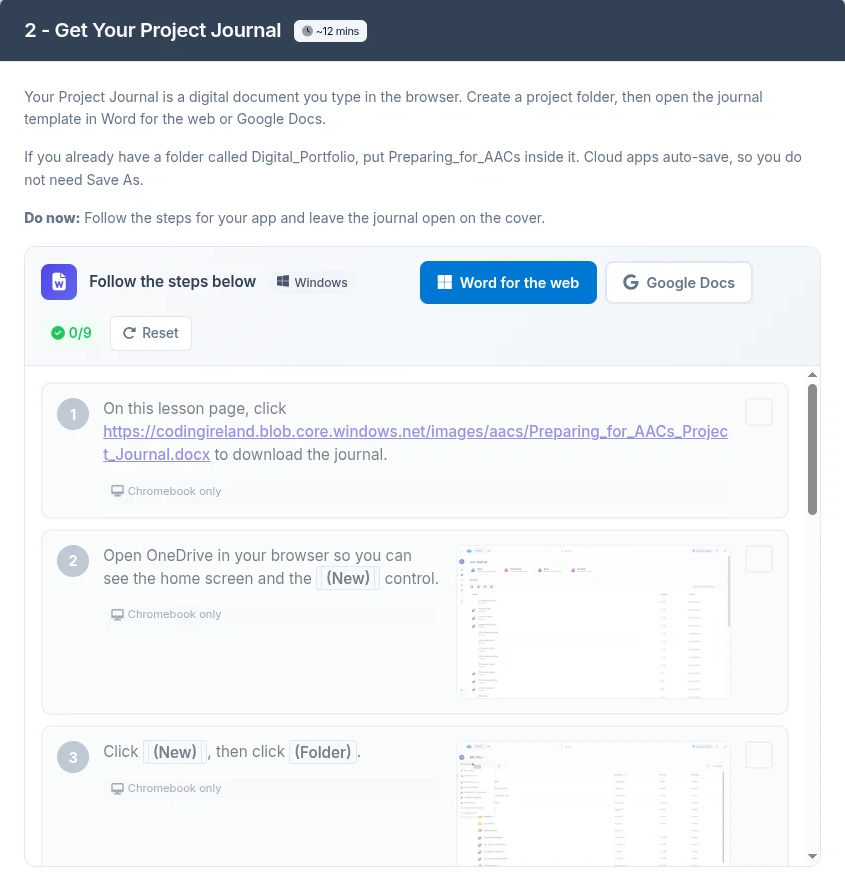
    2 - Get Your Project Journal ~12 mins

    Your Project Journal is a digital document you type in the browser. Create a project folder, then open the journal template in Word for the web or Google Docs.

    If you already have a folder called Digital_Portfolio, put Preparing_for_AACs inside it. Cloud apps auto-save, so you do not need Save As.

    Do now: Follow the steps for your app and leave the journal open on the cover.

    Download link for the Word journal on the lesson page
    Download link for the Google Docs version of the journal on the lesson page

    3 - The Stages of a Coursework Project ~6 mins

    A coursework project moves through stages. Each stage leaves something in your Project Journal:

    • Get Started
    • Question
    • Plan
    • Research
    • Gather Evidence
    • Analyse
    • Make
    • Evaluate
    • Report
    • Revise
    • Present and Reflect

    Work stage by stage. Your school sets the dates.

    Do now: Read the stages once. Notice what Get Started puts in the journal.

    4 - Worked Example: Meet the Canteen Cup ~8 mins

    The Canteen Cup is a finished, made-up example about reusable cups in a school canteen. Do not copy it. Your project uses a different brief.

    Do now: Read each callout, then move on when you can name what Get Started produced.

    The Canteen Cup across the stages

    5 - Journal Build: Choose Your Brief ~8 mins

    Choose one brief. Open Track waits for conference.

    • A Sweet Spot: €150 fundraiser return (recommendation)
    • B Keep It Warm: warmth over 20 minutes (poster)
    • C Find Your Way: first-year room finder (map or guide)
    • D Then and Now: local change over time (display)

    Do now: Pick by care, evidence you can get, and a one-line pitch, then write the letter.

    6 - Journal Build: Journal Cover and 01 Get Started ~12 mins

    Fill the cover, then type 01 Get Started only.

    The cover fields are your name, class, brief letter and title, and start date.

    In 01 write the brief in your own words, who would use the answer, why it matters, one skill goal, and one finding-out goal.

    Level 1 frame: I chose Brief __ because __. The person who would use my answer is __. It matters to me because __. Skill goal: __. Finding-out goal: __.

    Use your own words, not Canteen Cup lines.

    Do now: Type the cover and all of 01.

    7 - Check Yourself ~4 mins

    Rate each item yes or not yet. Add one short evidence note for each yes.

    Do now: Complete every row, then note which support level you will try next time.

    Check yourself

    8 - Lesson Summary ~5 mins

    You set up a Project Journal, met the stages, chose a brief, and typed the cover plus 01.

    The course also builds a short TY report PDF, a mini-project and a short presentation.

    This is TY rehearsal, not an SEC submission. Next you write a research question.

    End of lesson
    123learn · Sample lesson

    That was a sample lesson from Preparing for AACs

    Every lesson in the course is ready to teach like this one. See what else comes with it, and how to order it.

    Copyright Notice
    This lesson is copyright of Coding Ireland 2017 - 2026. Unauthorised use, copying or distribution is not allowed.
    🍪 Our website uses cookies to make your browsing experience better. By using our website you agree to our use of cookies. Learn more