Python Computer Science Databases
Intermediate
80 mins
Teacher/Student led

What you need:
Chromebook/Laptop/PC

Error Handling and Debugging

In this lesson, you'll explore error handling and debugging in Python web development. Learn to manage errors and fix bugs by creating a Flask app, introducing errors, and using try-except blocks and VS Code debugging tools to resolve them.
Teacher Class Feed

Load previous activity

    1 - Introduction

    In this lesson, you will learn about error handling and debugging in Python web development. Understanding how to manage errors and fix bugs is crucial for building reliable applications. You will create a simple Flask app that interacts with a database, intentionally introduce errors, and learn how to handle and debug them.

    By the end, you will know how to use try-except blocks for error handling, debug code in VS Code, and avoid common pitfalls like incorrect database connections or unhandled exceptions.

    2 - Set Up Your Project

    First, you need to create a new folder for this lesson's project and set up the environment.

    1. Open VS Code.
    2. Create a new folder on your computer called 'FlaskErrorHandling'.
    3. Open this folder in VS Code (File > Open Folder).

    Next, create a virtual environment to manage your project's dependencies.

    1. Open the Command Palette: View > Command Palette.
    2. Type 'Python: Create Environment' and select it.
    3. Choose 'Venv'.
    4. Select your Python version.
    5. VS Code will create a '.venv' folder.

    Next, Open a terminal in VS Code to install Flask.

    1. Go to View > Terminal.
    2. Run: pip install flask.
    3. Wait for the installation to complete. 

    3 - Create Sample Database

    You will create a sample SQLite database with a 'users' table. This will be used in your Flask app.

    Create a new file called 'create_db.py' in your project folder and add the following code:

    import sqlite3
    
    conn = sqlite3.connect('users.db')
    c = conn.cursor()
    
    c.execute('''CREATE TABLE IF NOT EXISTS users
                 (id INTEGER PRIMARY KEY,
                  name TEXT NOT NULL,
                  age INTEGER NOT NULL)''')
    
    # Insert sample data
    c.execute("INSERT INTO users (name, age) VALUES ('Alice', 25)")
    c.execute("INSERT INTO users (name, age) VALUES ('Bob', 30)")
    
    conn.commit()
    conn.close()
    print('Database created successfully!')

    Run this script in the terminal: python create_db.py.

    You should see 'Database created successfully!' and a new file 'users.db' in your folder. This database has a users table with two sample records.


    4 - Build Basic Flask App

    Now, create a basic Flask app to display users from the database. This will be the foundation where we introduce errors.

    Create a file called 'app.py' and add the following code:

    from flask import Flask, render_template
    import sqlite3
    
    app = Flask(__name__)
    
    @app.route('/')
    def home():
        conn = sqlite3.connect('users.db')
        c = conn.cursor()
        c.execute("SELECT * FROM users")
        users = c.fetchall()
        conn.close()
        return render_template('users.html', users=users)
    
    if __name__ == '__main__':
        app.run(debug=True)

    Create a 'templates' folder and then create the 'users.html' in it with:

    <!DOCTYPE html>
    <html>
    <head><title>Users</title></head>
    <body>
    <h1>Users</h1>
    <table border="1">
        <tr><th>ID</th><th>Name</th><th>Age</th></tr>
        {% for user in users %}
        <tr><td>{{ user[0] }}</td><td>{{ user[1] }}</td><td>{{ user[2] }}</td></tr>
        {% endfor %}
    </table>
    </body>
    </html>

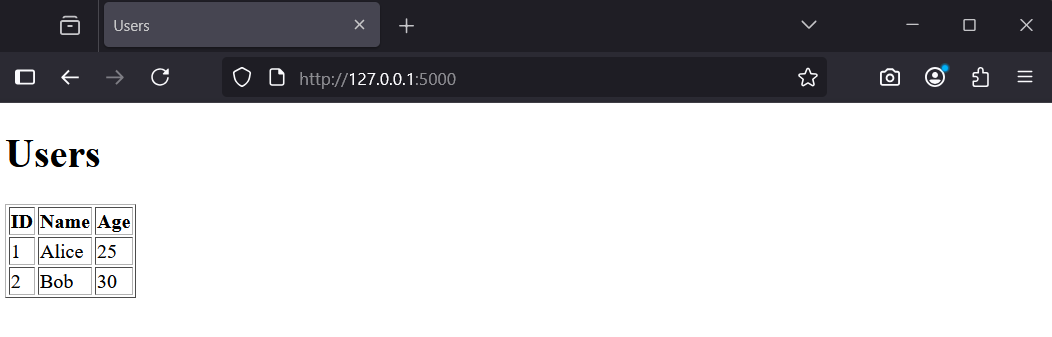
    Run the app: python app.py. Visit http://127.0.0.1:5000/ to see the users list.

    You should see a table with Alice and Bob. Next, we will introduce an error.


    123learn · Online learning platform

    Unlock the full learning experience

    You're previewing this lesson. Get full access to this lesson and hundreds more — each one ready to teach, with interactive activities, printable resources and pupil progress tracking built in.

    Hundreds of curriculum-aligned lessons
    Interactive activities in every lesson
    Printable resources & progress tracking
    Copyright Notice
    This lesson is copyright of Coding Ireland 2017 - 2026. Unauthorised use, copying or distribution is not allowed.
    🍪 Our website uses cookies to make your browsing experience better. By using our website you agree to our use of cookies. Learn more