1 - Introduction ~4 mins
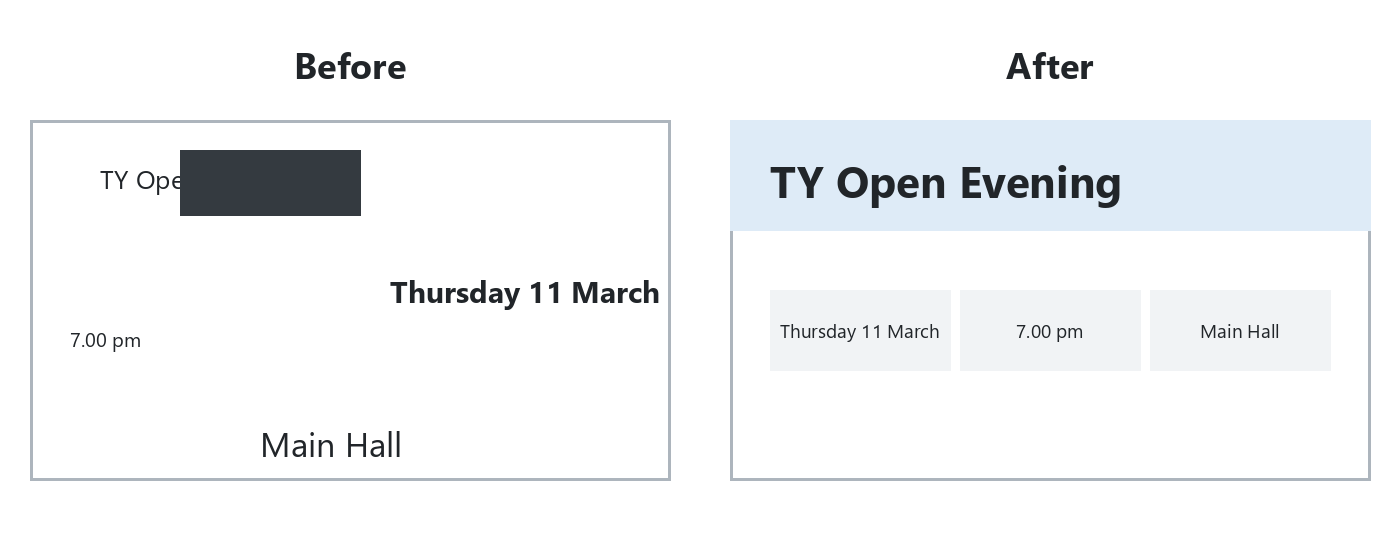 Messy slides hide the point. Fix a cluttered open-evening slide with four design principles, then tidy three slides of your talk.
By the end of this lesson, you will be able to:
- Explain contrast, alignment, repetition and space
- Align, distribute, group and reorder slide objects
- Design three slides in {{code:02_talk_deck}}
Warm-up
Look at the before panel. Silently name one thing that makes it hard to read.
2 - Key Concepts ~5 mins
Four principles guide every placement. Whisper one plain sentence per row, then start the fix-it task.
| Concept | Why it matters | Example |
|---|---|---|
| Contrast: stand out by size or colour | Finds the main point | Bold title, quieter body |
| Alignment: line up edges | Looks calm and deliberate | Three boxes, one top edge |
| Repetition: matching kinds match | One coherent deck | Same size on every detail |
| Space: empty areas matter | Stops crowding | Clear margin under title |
Align tools appear once several objects are selected: Arrange on the Home tab (or Align on the Shape tab) in PowerPoint for the web, and Arrange in Google Slides.
3 - Step-by-step Task: Fix a Cluttered Slide ~18 mins
Build the messy open-evening slide from the list, then fix it. Core path: title, three details, align, distribute, notes. Group and bring-to-front only if you have time. If Align is greyed out or Distribute does nothing, open Common issues (next step), then return.
Four separate text boxes (scatter them on purpose):
- TY Open Evening
- Thursday 11 March
- 7.00 pm
- Main Hall
4 - Common Issues ~2 mins
Common Issues
Stuck mid-task? Check here, then return to the fix.
| Issue | Solution |
|---|---|
| Align is greyed out | Multi-select two or more objects with {{kbd:Ctrl}} or {{kbd:Cmd}} click first |
| Distribute does nothing | Select three or more objects that do not already share equal gaps |
| Shape covers the title | Select the title, then Bring to Front (web) or Bring to front (Slides) |
5 - From Practice to Your Talk ~3 mins
Same tools, your words. Say your storyboard has the line "ticket price and door time". On the slide it becomes the title with two short boxes underneath, "Tickets €5" and "Doors open 7.00 pm", lined up on one top edge (alignment).
On each slide:
- Keep the title
- One sentence or up to three short bullets in separate boxes
- Optional light shape behind the title
- Align related boxes to one edge
- Distribute a row of three; group what belongs together
- Bring the key item forward if it overlaps
- Notes: {{code:Strongest principle: ___ because ___}}
Next: copy your storyboard and design three slides.
Unlock the full learning experience
You're previewing this lesson. Get full access to this lesson and hundreds more — each one ready to teach, with interactive activities, printable resources and pupil progress tracking built in.
This lesson is copyright of Coding Ireland 2017 - 2025. Unauthorised use, copying or distribution is not allowed.