1 - Introduction

Why Evaluate Sources?
In your Classroom-Based Assessment (CBA) project for Digital Media Literacy, you will be required to conduct research on topics such as online safety or the ethics of artificial intelligence. However, not all information available online is trustworthy; some may be inaccurate, biased, or outdated. By learning to evaluate sources effectively, you can ensure that you select reliable information, avoid the pitfalls of misinformation, and ultimately strengthen the quality of your project.
This skill is directly connected to the 'Research and Source Evaluation' Feature of Quality in your CBA. To assist you, here is a detailed reminder of the Features of Quality levels, which outline the standards expected in your work:
Features of Quality Levels:
- Yet to meet expectations – The work does not include sufficient detail to fully satisfy the Features of Quality. It represents a good attempt but lacks clarity or contains significant gaps.
- In line with expectations – The work reflects most Features of Quality effectively, demonstrating a solid understanding, and is generally competent and accurate.
- Above expectations – The work reflects all Features of Quality to a high standard, with notable detail, precision, and a strong grasp of the subject matter.
- Exceptional – The work achieves a very high standard, where strengths significantly outweigh any minor flaws.
Specific Features of Quality for Research and Source Evaluation:
These range from difficulties in identifying appropriate sources (Yet to Meet Expectations) to the critical evaluation of multiple sources with outstanding reasoning and insight (Exceptional).
Mastering source evaluation will enable you to target 'Above Expectations' or even 'Exceptional' in this aspect of your CBA. For instance, using credible sources will enhance the credibility of your arguments and demonstrate your ability to discern quality information.
2 - Spot the Fake Headline
 This exercise will help you understand the importance of assessing the reliability of information you encounter online.
Carefully examine the following two headlines:
- Headline 1: 'Scientists Discover New Planet in Our Solar System' (published on a well-established science website, such as NASA's official site).
- Headline 2: 'Aliens Invade Earth – Government Cover-Up Exposed!' (posted on an unknown blog with no identified author).
Take some time to analyse these headlines. In your notebook, note down which one you think is real and reliable, and provide an explanation for your choice. Think about aspects such as the source of the information, the type of language used, and any possible evidence that could support the claim.
After recording your thoughts, click the button below to reveal the correct analysis.
3 - Learn the CRAAP Test
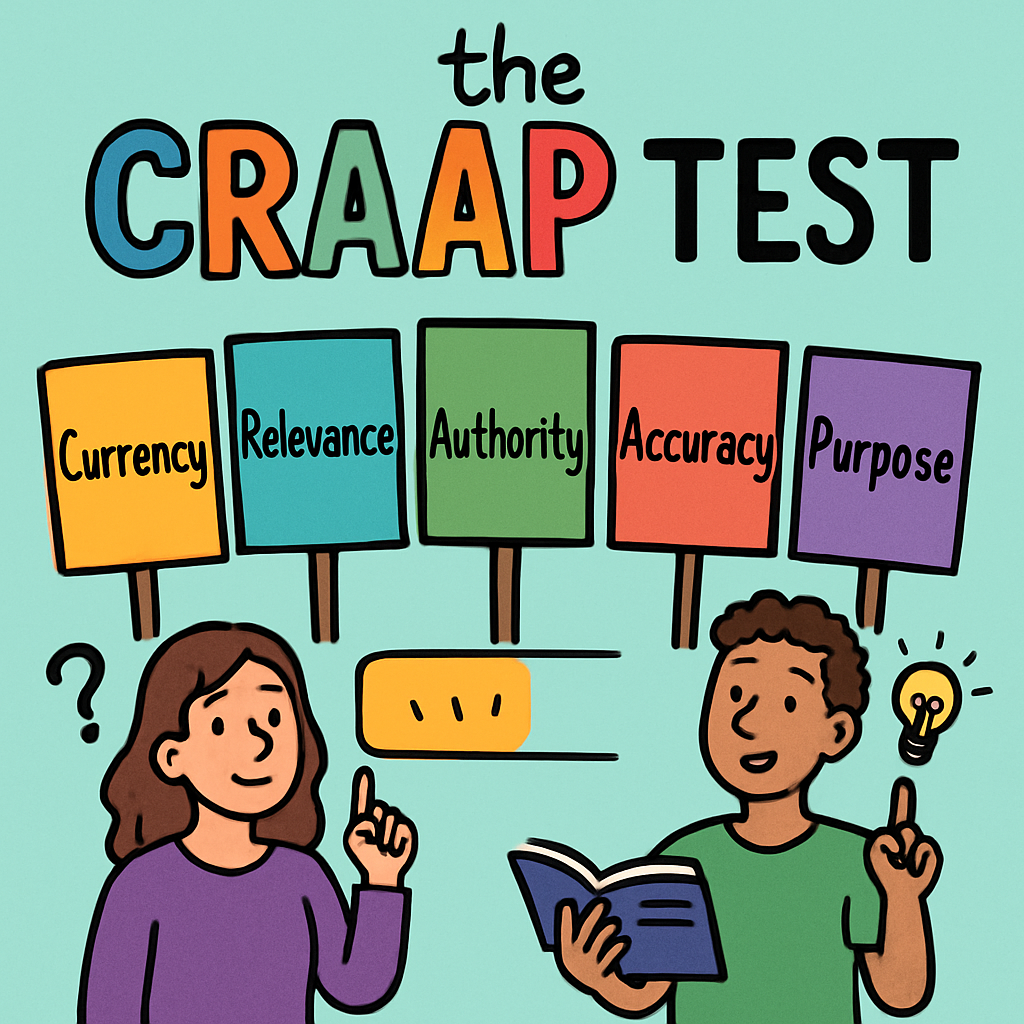
Introducing the CRAAP Test
In this section, you will learn about the CRAAP Test, a structured method for evaluating the reliability of sources. This tool is particularly useful for your research in Digital Media Literacy, ensuring that the information you use is trustworthy and appropriate for your Classroom-Based Assessment (CBA) project.
The acronym CRAAP represents five key criteria: Currency, Relevance, Authority, Accuracy, and Purpose. By applying these criteria, you can systematically assess any source, such as a website, article, or blog post. Below is a detailed explanation of each criterion, including questions to ask yourself and an example to illustrate its application.
- Currency
- This refers to the timeliness of the information. Ask yourself: When was the information published or last updated? Is it current enough for your topic? For rapidly changing subjects like technology, recent sources are essential.
- Example: A 2023 article discussing advancements in artificial intelligence would be more current and useful than one from 2010, as the field evolves quickly.
- Relevance
- This assesses how well the information matches your needs. Ask yourself: Does the content directly relate to your research question? Is it at an appropriate level for your project (not too basic or too advanced)?
- Example: If your CBA topic is online safety, an article about privacy settings on social media platforms would be highly relevant, whereas one about general internet history might not be.
- Authority
- This evaluates the credibility of the source's creator. Ask yourself: Who is the author or publisher? Do they have expertise or qualifications in the subject? Is the source from a reputable organisation?
- Example: An article on a government education website, written by a qualified expert, is more authoritative than a post on an anonymous personal blog.
- Accuracy
- This checks the reliability and truthfulness of the content. Ask yourself: Is the information supported by evidence, such as data or references? Are there any errors or unsupported claims?
- Example: Look for facts backed by studies or statistics, rather than relying on personal opinions without verification.
- Purpose
- This examines the reason the information exists. Ask yourself: Is the purpose to inform, entertain, persuade, or sell something? Could there be any bias influencing the content?
- Example: A neutral news article aims to inform objectively, while an advertisement might be biased to promote a product.
4 - Practice the CRAAP Test
 Guided Practice with the CRAAP Test
In this step, you will apply the CRAAP Test to two provided example sources: one good example and one bad example. This guided practice will help you become familiar with the evaluation process before you assess sources independently. Begin by copying Worksheet 1 into your notebook or creating it digitally. The worksheet is designed to evaluate up to two sources, and for this practice, we will evaluate both examples.
Worksheet 1: CRAAP Test Evaluation Table
| Criterion | Source 1 Rating (1-5) | Source 1 Notes | Source 2 Rating (1-5) | Source 2 Notes |
|---|---|---|---|---|
| Currency | ||||
| Relevance | ||||
| Authority | ||||
| Accuracy | ||||
| Purpose | ||||
| Overall Score |
Rating Scale: 1 = Poor, 2 = Fair, 3 = Good, 4 = Very Good, 5 = Excellent. Calculate the overall score by adding the ratings for the five criteria (maximum 25).
Example Source 1 (Good Example): A 2024 article from the BBC website titled 'Protecting Your Online Privacy', authored by a qualified technology journalist. The article includes facts supported by expert interviews and statistical data, with no advertisements or promotional content.
Example Source 2 (Bad Example): A 2010 blog post on an unknown website titled 'Online Privacy is a Myth – Shocking Truth Revealed!', with no identified author. The post makes sensational claims without any evidence or references, and includes ads for privacy software.
Now, evaluate both sources using the CRAAP Test. For each criterion, assign a rating from 1 to 5 and provide brief notes explaining your reasoning. Once you've filled in the table, use the toggle below to reveal a suggested evaluation guide. Remember, these are recommendations to help you think about your own ratings – your scores might vary slightly based on your reasoning.
Reveal Suggested Evaluation
For Source 1:
- Currency: Likely rating 4-5 (The article was published in 2024, making it recent and suitable for topics in digital media that evolve quickly).
- Relevance: Likely rating 4-5 (The content directly addresses online privacy, which is pertinent to digital media literacy and your CBA project).
- Authority: Likely rating 4-5 (The BBC is a reputable organisation, and the author is a recognised expert in technology journalism).
- Accuracy: Likely rating 4-5 (Information is supported by evidence from reliable experts and data sources, with no apparent errors).
- Purpose: Likely rating 4-5 (The purpose is to inform readers objectively, without bias or intent to sell products).
- Overall Score: Likely 20-25/25 (This source demonstrates high reliability across all criteria).
For Source 2:
- Currency: Likely rating 1-2 (Published in 2010, the information is outdated for current digital privacy issues).
- Relevance: Likely rating 2-3 (It discusses privacy, but the sensational style makes it less suitable for serious research).
- Authority: Likely rating 1-2 (No identified author or reputable publisher, making it hard to trust).
- Accuracy: Likely rating 1-2 (Claims are unsupported by evidence, with potential errors due to lack of references).
- Purpose: Likely rating 1-2 (Appears biased to promote ads, rather than objectively inform).
- Overall Score: Likely 6-11/25 (This source shows low reliability and should be avoided).
Compare this guide to your own evaluation. This practice will prepare you for evaluating real sources in subsequent steps.
5 - Spot Red Flags
 Identifying Red Flags in Sources
In addition to using the CRAAP Test, it is important to recognise 'red flags' – these are warning signs that a source may not be reliable. Spotting these red flags can help you quickly decide whether a source is worth evaluating further. This skill is particularly useful for your Classroom-Based Assessment (CBA) project, as it allows you to avoid misinformation and select trustworthy information, contributing to higher standards in the Features of Quality.
Red flags include elements that suggest bias, inaccuracy, or a lack of credibility. Below is Worksheet 2, an interactive checklist you can use to identify these signs in any source. Practise applying it to the provided example by ticking the boxes where applicable.
Worksheet 2: Red Flags Checklist
| Red Flag | Present? (Tick if yes) |
|---|---|
| Emotional or sensational language (e.g., 'Shocking!' or 'You won't believe!') | |
| Missing author or publisher information | |
| Poor grammar or spelling errors | |
| Outdated information | |
| Lack of evidence or supporting sources | |
| Obvious bias (e.g., one-sided views without balanced perspectives) |
Go through each red flag and decide if it applies. For instance:
- Emotional or sensational language: Yes (words like 'BREAKING' and 'superpowers' are designed to provoke strong reactions).
- Missing author or publisher information: Yes (assuming no author is named in this context).
- Poor grammar or spelling errors: No (the text is grammatically correct, though simplistic).
- Outdated information: Not applicable here, but check dates in real sources.
- Lack of evidence or supporting sources: Yes (claims are made without any references or studies).
- Obvious bias: Yes (promotes 'magic pills' and dismisses doctors, suggesting a motive to sell products).
This snippet has several red flags, making it unreliable. It would score poorly on the CRAAP Test, particularly in Accuracy and Purpose.
After ticking the boxes above, copy the checklist into your notebook if you wish, and write a short explanation of why this source is unreliable. Consider how spotting these red flags can help you achieve 'Above Expectations' in your CBA by ensuring you use only credible sources.
Unlock the full learning experience
You're previewing this lesson. Get full access to this lesson and hundreds more — each one ready to teach, with interactive activities, printable resources and pupil progress tracking built in.
This lesson is copyright of Coding Ireland 2017 - 2025. Unauthorised use, copying or distribution is not allowed.