You can already make a sprite appear on screen in a block editor — today we use that to start a real game. We are coding in MakeCode Arcade and building our first arcade project step by step at our devices.
Before we touch the editor, quick question: what makes an arcade game fun to play? On your paper, jot the goal, your player sprite, and what scores or loses a life. We will predict first, then build, run and fix.
Set the scene: today they plan and build their first arcade game. Have devices logged in to the platform and arcade.makecode.com open on the board. Ask the recap question — what makes a game fun? Keep this brief; the energy is for the build.
Before anyone runs anything, look at what we are about to build and commit to a prediction. When the program runs, what will you see first on the simulator screen? What do you think will happen when you press the direction buttons? Say it out loud to your partner before you click run.
Run the PRIMM predict beat. Before anyone runs anything, collect two or three predictions about what the screen will show first and what the buttons will do. Write them on the board to revisit at the make-sense step. Differentiation: prompt quieter pairs with 'what colour or shape do you expect?'
MakeCode Arcade is a fun and easy-to-use tool that lets us create our own arcade games. It's like a digital playground where we can build and play games right in our web browser.
With MakeCode, we can use colourful blocks to build our games, just like Scratch.
If you have a small handheld gaming computer like the BrainPad or GameGo, you can even put the games you make onto it and play them anywhere!
.png)
Quick framing of what MakeCode Arcade is. Link it to the block editors students already know (Scratch, micro:bit). Key question: 'How is this similar to editors you've used before?' No need to dwell — keep it under two minutes.
Imagine the MakeCode Arcade code editor as a magical toolbox. It's a lot like the Microbit and Scratch editors you might have used before. Here's what it has:
- A simulator, which is like a mini TV screen where you can watch your code come to life and play the games you create.
- A toolbox, which is like a chest full of different code blocks. These blocks are sorted into groups so you can easily find what you need.
- A code area, which is like your construction site. This is where you build your code.
.jpg)
Orient students to the three areas: simulator, toolbox, code area. Point to each on the board. Misconception to head off: students think the simulator is separate from their code — show that the simulator updates live as blocks change.
Let's create our first project!
Go to the Arcade MakeCode website and create a new project. You can call your project anything you want!
Create a new Arcade project using the makecode.com website.

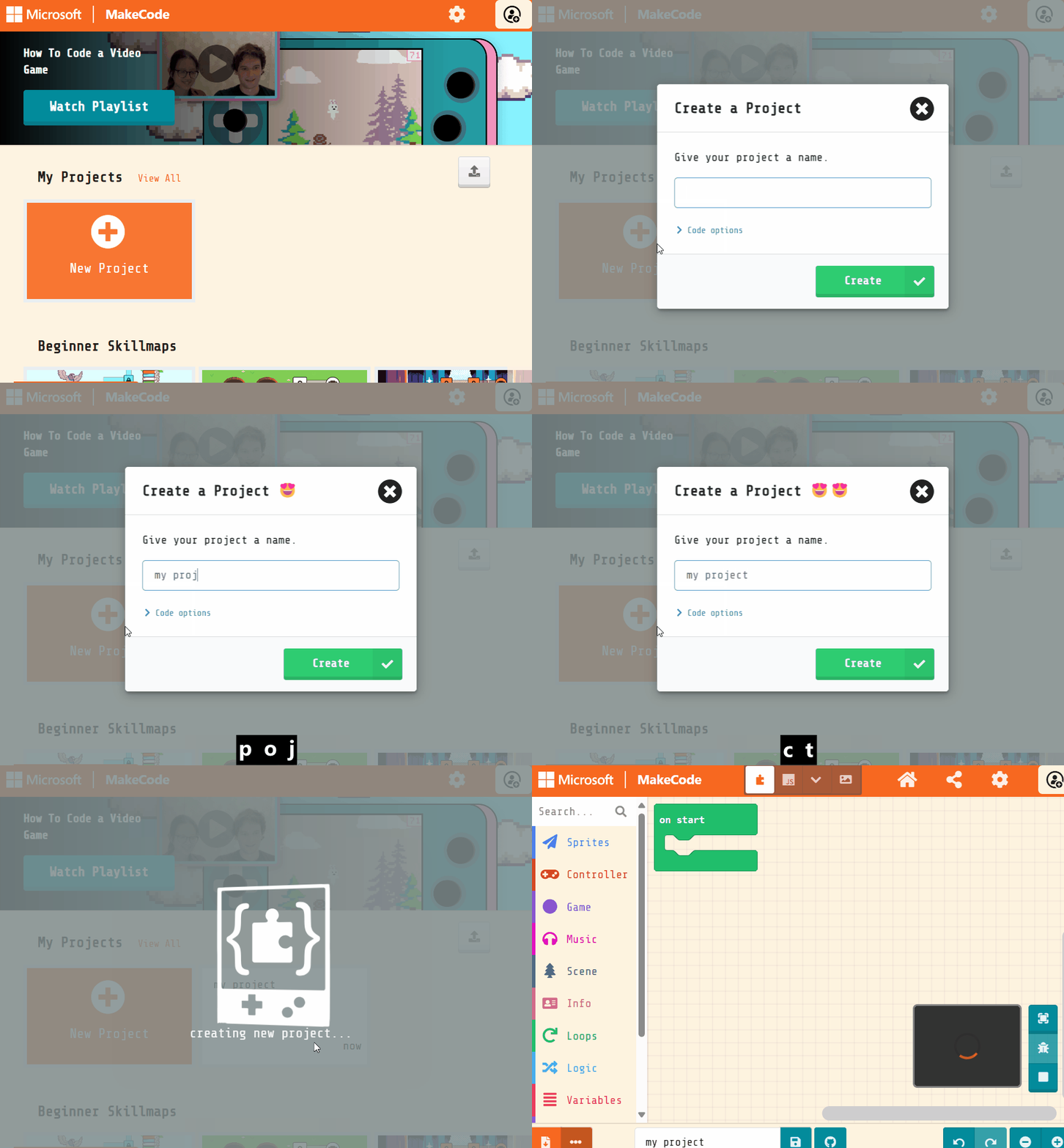
Model creating a new project on the board. Watch for students who get stuck at the login or new-project screen. Remind them to name it something they will recognise later. Differentiation: pair a confident student with anyone unsure of navigation.
Unlock the full learning experience
You're previewing this lesson. Get full access to this lesson and hundreds more — each one ready to teach, with interactive activities, printable resources and pupil progress tracking built in.
This lesson is copyright of Coding Ireland 2017 - 2025. Unauthorised use, copying or distribution is not allowed.